If you have ever tried to read a plate after a close call, you already know how quickly details disappear. Glare from a wet windshield can wash out the scene, night streets can turn into a blur of headlights, and a parking-lot bump can happen while you are inside a store. To mitigate these issues, you need to choose the best dash cam for your specific needs, but that is only half the battle; you must also build a clear setup that stays stable, records consistently, and keeps files easy to review. This guide focuses on the everyday habits and settings that make footage actually usable when you need it.
Example Feature Reference
One useful reference point is the Vantrue dash cam N5S, which is listed as a four-channel system with buffered pre-recording, motion detection for parked events, built-in GPS, and support for up to 1TB of microSD storage. These are helpful examples because they map to the same clarity basics you should look for in any camera, regardless of model.
Defining Clear Footage
Daytime Clarity Basics
Clear dash cam footage lets you follow the story without guessing. You should be able to see lane markings, traffic lights, and the relative position of vehicles as they merge or brake. Plates can be hard in motion, but you can still judge whether the video keeps fine edges sharp, such as road signs and car badges, without turning them into blocks.
Night and Low-Light Clarity
At night, “clear” often means readable context more than perfect detail. Look for stable exposure that does not blow out headlights or crush everything else into darkness. If you use an in-car camera, cabin clarity depends on whether the interior lens can see faces and hands without a bright dome light. Some systems switch interior cameras to infrared for night visibility, which typically produces a black-and-white look but can preserve details inside the car.
Camera Specs That Matter
Resolution and Frame Rate
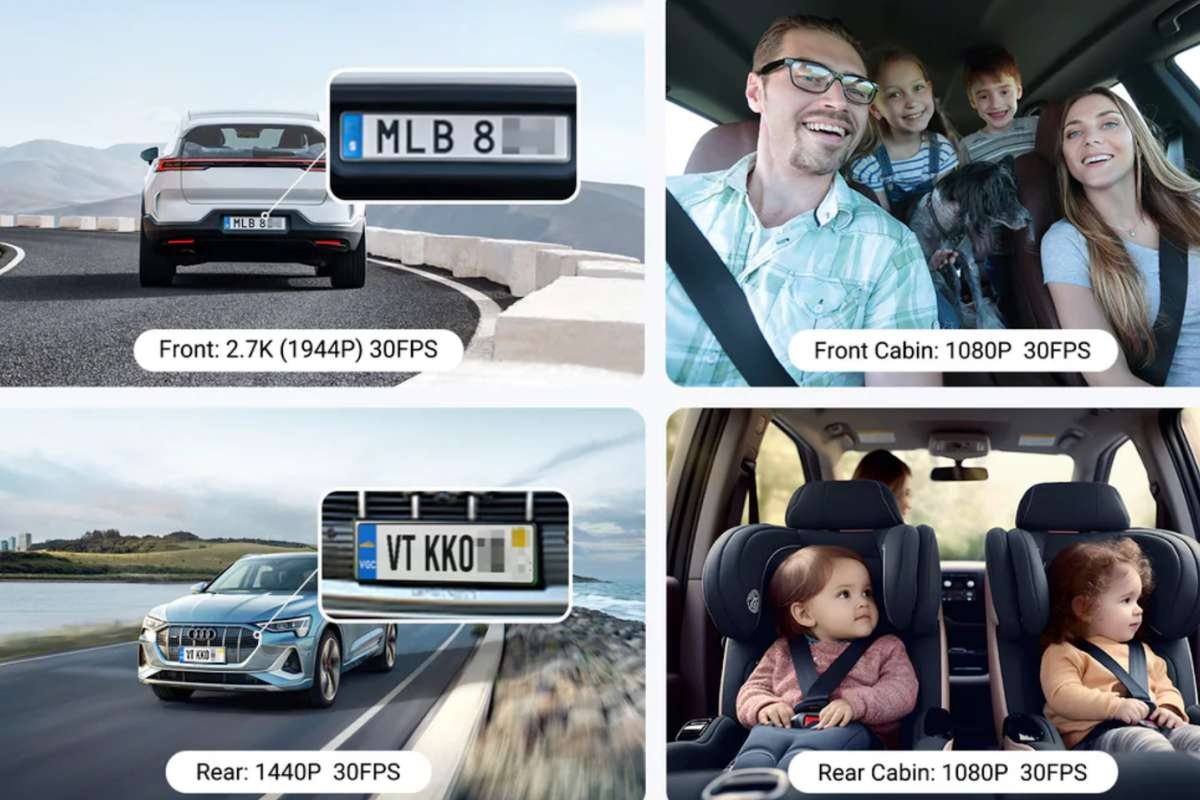
Resolution helps when you zoom in, but it is not the whole story. Higher resolution can preserve fine detail, while a higher frame rate can reduce motion blur when cars move fast, or your road is bumpy. In practice, you want a balance: enough resolution to read signs and enough frame rate to keep fast changes smooth.
Coverage vs Detail Tradeoffs
When you choose the best dash cam, consider that a front-only unit may miss events happening behind your vehicle. A front and rear dash cam adds context for rear impacts, tailgating, and lane-change disputes. A 3-channel dash cam adds an in-cabin view that can help with rideshare situations, passenger disputes, or basic theft deterrence. The more views you record simultaneously, the more your system must distribute processing and storage across streams. Your goal is not to maximize channels, but to achieve the right angles with consistent clarity.
Here is a practical way to decide: if you primarily worry about traffic incidents, start with front- and rear-coverage. If you worry about parked break-ins or passenger activity, consider adding an interior view. If you want a single reference point for what multi-view setups look like in the real world, you can review a product page, such as Vantrue’s dash cam, and compare its channel layout and storage requirements to your own needs without treating it as a requirement.
Lens Angle and Perceived Sharpness
Wide-angle lenses capture more, but they can make distant objects look smaller. That can make plates and street signs appear less sharp, even when the video is technically high-resolution. If your lens is extremely wide, you may see more context, but you may lose useful detail at a distance. Try to prioritize a view that captures the full lane ahead without stretching the edges too much.
Managing Glare and Contrast

HDR and WDR Scenes
High-contrast moments are common: you exit a tunnel into bright sun, you face sunset, or you pass under strong streetlights. HDR or WDR-style processing aims to keep detail in both bright and dark areas so you can still see a car in shadow and a colorful sky at the same time. When you choose the best dash cam, ensure it supports these modes and test them during your commute. The ideal setting is one that keeps license plates and lane lines visible without flicker.
Infrared for Cabin Clarity
If you use an interior camera, infrared illumination can help at night without lighting up the cabin. The trade-off is that infrared night video often appears monochrome and is sensitive to reflections from glass and other shiny surfaces. If you want cabin footage primarily for security, focus on whether faces and hand movements remain visible in low light.
Placement and Optical Filtering
Your first anti-glare tool is placement. Mount the camera where it sees more road and less dashboard reflection, usually high and centered behind the rearview mirror. Keep the windshield clean inside and out. If glare still dominates, a CPL filter can reduce reflections on glass and improve contrast in many daytime situations. Remember that filters can also reduce the light reaching the sensor, so you should confirm that your night footage does not degrade after adding one.
Installation and Power Choices

Mount Stability and Alignment
Clear footage depends on stability. A secure adhesive mount usually holds better than a loose suction cup on hot days, although either can work if installed well. Level the horizon and aim the camera slightly downward so it captures the road and the vehicles around you, not mostly sky. After installation, record a short clip and check that the image is not vibrating and that your wipers do not block the view.
Heat and Cold Reliability
Dash cams live in harsh conditions. Heat can cause shutdowns, warped mounts, and memory card errors. Cold can slow batteries and stiffen cables. When you choose the best dash cam for your specific climate, look for designs with high temperature tolerance and plan for seasonal checks to ensure the device remains functional, regardless of whether your cabin is freezing or sweltering.
Parking Monitoring and Buffering
Parking mode is where many clarity issues arise. A useful system should trigger on motion detection or impact detection and capture enough time before and after the event to explain what happened. Pre-event buffering helps because it records a few seconds before the trigger, which can show the approach of the car or person. If you want longer coverage, time-lapse parking can extend storage by recording fewer frames per second, while still being clear enough to capture the sequence of events.
Power matters. A hardwire kit can enable parking mode and reduce clutter, but you should use battery protection, such as a low-voltage cutoff, so your car can still start. If you are not comfortable with fuse boxes, a professional installation is worth considering for safety and reliability.
Keeping Recordings Usable
Card Capacity and Endurance
When you choose the best dash cam, remember that your memory card is an essential component. Multi-channel recording and higher resolution generate more data, which fills cards faster and increases wear. Use a high-endurance microSD card designed for continuous write operations—plan capacity based on your driving time and whether you use parking mode. As a general rule, if you overwrite the card every day, you may not keep footage long enough to find what you need.
GPS Logging for Review
GPS logging can add time, speed, and location context during review. That context can be helpful when you need to match footage to a specific intersection or prove the timeline of events. Make sure GPS data is recorded in a way you can access later, such as through a companion app or desktop viewer.
Transfers and Archiving Habits
Clarity is wasted if you cannot retrieve the clip. Practice exporting one file before you need it. If you rely on Wi-Fi transfer, test the download speed and confirm your phone can play the file. If you use a card reader, keep it in your glove box. After any incident, save the clip, make a backup copy, and avoid editing the original. A simple folder system by date can help you find what you need months later.
Conclusion
Clear footage comes from the whole setup, not just a spec sheet. Choose the best dash cam for your driving, then protect its clarity with a stable mount, smart glare control, and a power plan that supports parking mode without draining your battery. Use high-endurance storage, test your transfer method, and keep your lens area clean. If you want a reference for how multi-view systems are packaged, the Vantrue dash cam can help you compare features, but your best results will come from consistent setup and maintenance.