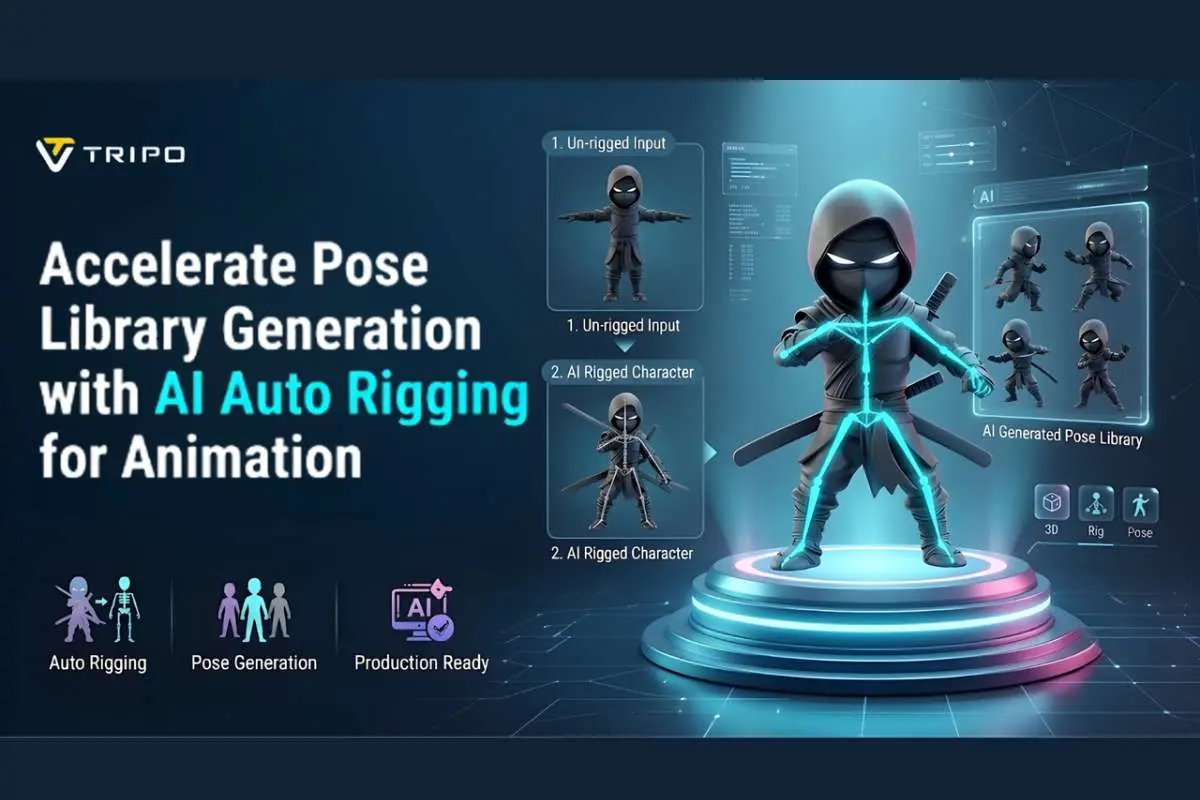
Pose library helps to speed up animation in games and visualization. This will help you create poses faster and in a more consistent manner for characters and scenes—Tripo 3D offers AI-powered rigging and animation preparation for a variety of models. The setup of skeletons is quicker, reducing manual steps prior to pose design. Reuse pose collections for efficiency within pipelines. In this article, we’ll get into the details of AI Auto Rigging, pose libraries, and the Tripo 3D workflow. It also includes optimization methods for scalable animation systems.
Understanding the Connection Between AI Auto Rigging and Pose Libraries

In contemporary animation workflows, pose libraries and AI Auto Rigging for Animation go hand in hand. Tripo 3D takes assets from the concept phase to a usable rig. This also includes workflows that involve 2d to 3d transformation for character design. Automated skeleton mapping speeds up the pose creation process across assets. Artists use the same poses in more than one scene or character. This link cuts down on the repetitive setup tasks to a great extent. It also provides for scalable animation production for interactive media.
What Is a Pose Library?
Pose libraries are collections of character poses that can be utilized again in animation processes. It has pre-defined body positions to use for consistent motion re-use. Pose outputs of the generated animation can be stored on Tripo 3D. These collections are useful to maintain the movement from one scene to another. In libraries, the same type of characters is not repeated because they are manually posed. Animators categorize poses according to the action as well as the emotional state. This system helps to control the assets in big animation productions.
How AI Auto Rigging Supports Pose Generation

Tripo 3D’s AI tools simplify the process of creating character skeletons. The auto rigging system helps accelerate animation setup and reduces manual preparation. Humanoids and creatures have automatic bone detection. Skin weighting helps distribute deformations more evenly across joints. This reduces the amount of manual setup time before the start of pose testing. It also supports smoother integration across different animation tools and workflows. This approach can help speed up pose generation and support more complex assets.
Core Components That Influence Pose Library Quality

Core components of any pose library system determine quality. The quality of joint placement and hierarchy depends on the underlying skeleton structure. Proper alignment helps create smoother transitions between movements. Skin weight distribution influences pose transitions and can help reduce unwanted deformation. Balanced weight distribution can reduce visual artifacts during movement. Consistent rig structures make it easier to reuse poses across different model types. Together, these factors improve the stability and usability of the pose library. The built-in free 3d models in Tripo 3D can serve as a starting point for building a well-organized pose library.
Steps to Pose Library Generation Accelerated with AI Auto Rigging for Quick Animation
Step 1: Prepare Assets for Motion Presets

- First, you need to access Tripo 3D and sign up. Next, go to the “Animate” tab present in the vertical left menu bar.
- Next, upload the model by clicking “Upload 3D Model” or select an existing model from the assets menu present on the extreme right vertical menu.
Step 2: Build Pose Variations with AI

- Choose the model from the “AI Model” menu. Model v2.5 is good for animals, and model v1.0 is good for humanoids. Select one depending on your needs.
- After selecting the model, click on the “Auto Rig” tab. The tool starts the rigging process. Make sure your model is textured before you rig.
- Next, select the animation style from the menu presented below. You can choose “afraid”, “agree”, “angry”, “clap”, “climb”, “cry”, “dance”, etc.
- The selected animation will be applied within a few seconds.

Step 3: Fine-Tune and Export Motion Assets
- You can also edit the “Environment Settings” and camera settings through “Reset Camera”.
- If you want, you can 3D print the design, or you can also share directly by clicking “3D Print”. You can also “Refine” your design right through the bottom menu.
- In the end, click on the “Export” tab from the bottom menu. Next, choose the resolution, format, and filename, and click again on “Export” to save the design to your local device.

Building a Reusable Pose Library with Tripo 3D
In Tripo 3D, pose libraries are created by capturing animation outputs. Poses can be extracted from generated motion sequences. These poses are commonly organized into idle, action, emotional, and interaction categories. Consistent naming conventions help organize and manage assets more efficiently. Tripo 3D allows for the reuse of poses in similar rigs. This approach can support scalability in multi-character projects. Well-structured libraries simplify integration with animation pipelines. Version control makes it easier to track pose changes across iterations and revisions.

Key Elements That Accelerate Pose Library Creation
- Automatic Joint Mapping: places bones in appropriate positions to support initial rig setup and character scaling.
- Animation-Ready Skeletons: allow pose testing shortly after rig generation within the Tripo 3D environment.
- Balanced Skinning: helps achieve smoother bending around major joints and limbs during movement.
- Multiple Character Compatibility: supports humans, animals, stylized characters, and mechanical designs.
- Flexible Export Options: FBX and GLB integration with Blender, Maya, Unity, and Unreal pipelines.
- Rapid Animation Previewing: enables quick reviews of animation poses before exporting or refining them.
Optimizing Pose Libraries for Fast Animation Production
Optimizing pose libraries requires structured categorization and indexing. Functional grouping makes it easier to locate idle and action poses. Reusability practices allow for the reuse of similar character rigs. Tripo 3D can be used in Blender, Maya, Unity, and Unreal workflows. This flexibility supports integration across a variety of production pipelines. Searchable systems make it easier to retrieve assets from large libraries. Well-organized structures can simplify the expansion of animation projects. This reduces search time and improves workflow efficiency.
Common Challenges in Pose Library Development
Pose distortion when making extreme movements is a common problem. Some distortion issues may be present in the skinning. Rig compatibility often depends on character proportions. Additional adjustments may be required to maintain consistent pose transfer. Managing large numbers of assets can become increasingly challenging. Proper naming and tagging help keep libraries organized. Careful review of animations can help reduce inconsistencies across projects.
Conclusion
AI Auto Rigging systems streamline the process of creating pose libraries throughout the animation pipeline. Improved skeleton structures and skinning can support more effective motion reuse. Structured libraries simplify the management of complex scenes. Automation reduces the amount of manual preparation required before animation work begins. Consistent workflows make it easier to adapt character animation for multiple platforms. Efficient pose systems can provide greater flexibility for interactive media development.