What Microsoft Copilot Actually Changes About Business Collaboration?
Microsoft Copilot for business collaboration sounds like the sort of thing that should make your team’s 47-message Teams thread feel less like a detective case. And that is roughly the point.
Enterprise teams rarely suffer from a shortage of information. They suffer from having it everywhere: Team chats, meetings, emails, documents, decisions, and follow-ups. By the time someone asks, “What did we decide again?”, the answer may be buried somewhere between Tuesday’s meeting and a document nobody can remember naming.
Microsoft’s 2025 Work Trend Index puts some scale behind that problem: the average employee receives more than 100 emails and 150 Teams messages a day, while nearly one in three employees say they struggle to keep up with the pace of work.
Copilot can help cut through some of that clutter. In Teams and Microsoft 365, it can summarize conversations, recap meetings, surface decisions and action items, help people prepare for meetings, and work with information they already have permission to access.
That becomes particularly useful in cross-functional collaboration and collaboration between departments, where information has a habit of taking the scenic route.
The bigger idea is simple: Copilot is most useful when it reduces the friction between conversation, information, decision, and action. It does not replace collaboration. It helps people spend less time hunting for it.
Where Microsoft Copilot Fits Into the Enterprise Collaboration Workflow
The easiest way to understand Copilot is to follow a normal workday. Not the polished version where everyone arrives prepared and leaves meetings with perfectly assigned action items. The real one, where someone asks for the meeting link five minutes before it starts.
Before a meeting, Copilot can help employees pull together relevant context, summarize existing information, and prepare for the discussion. During the meeting, it can help surface key points, capture decisions, and identify action items. Afterward, the recap can help people catch up without watching an hour-long recording at 1.5x speed. Between meetings, it can help employees find information and turn conversations into something they can actually use.
| Collaboration stage | What Copilot can help with |
| Before | Find context, summarize information, and prepare |
| During | Capture discussion points, decisions, and actions |
| After | Recap conversations and identify follow-ups |
| Between meetings | Find information and turn discussion into work |
That makes Copilot less about adding another tool and more about working within the business collaboration tools employees already use. For teams considering Microsoft Copilot for business collaboration, that distinction matters. The value is not another place to work. There is less friction between the places where work already happens.
The Real Strength of Microsoft Copilot Is Its Microsoft 365 Context
Microsoft Copilot for business collaboration is not especially interesting just because it has AI. At this point, that would be like calling a laptop impressive because it has Wi-Fi. The more important question is where that AI can actually work.
For an enterprise already living in Outlook, Teams, SharePoint, OneDrive and the wider Microsoft 365 ecosystem, Copilot has one major advantage: context.
Why that context matters?
Microsoft 365 Copilot can use Microsoft Graph to ground responses in work information the user already has permission to access, including emails, documents, chats and meetings. That can help in three practical ways:
- Less searching: Employees can spend less time digging through old chats, files, and emails for background.
- Less context switching: Information can be pulled together across the Microsoft 365 environment rather than requiring a tour of five different apps.
- More continuity: A conversation that starts in Teams does not have to become a completely separate information hunt later.
This matters because enterprise collaboration rarely happens in one neat little box. A decision might start in a Teams chat, move into a meeting, appear in an email, and eventually land in a spreadsheet nobody remembers creating.
There is also a governance consideration. Microsoft says prompts, responses, and Microsoft Graph data accessed by Copilot are not used to train foundation models. The bigger point is simple: AI in business collaboration becomes more useful when it understands the work around the request, not just the request itself.
Where Copilot Falls Short, Especially at Enterprise Scale?
This is where the shiny product story needs a reality check. Microsoft Copilot for business collaboration can make information easier to work with, but it cannot turn a badly organized enterprise into a well-organized one. Sadly, there is no button for that.
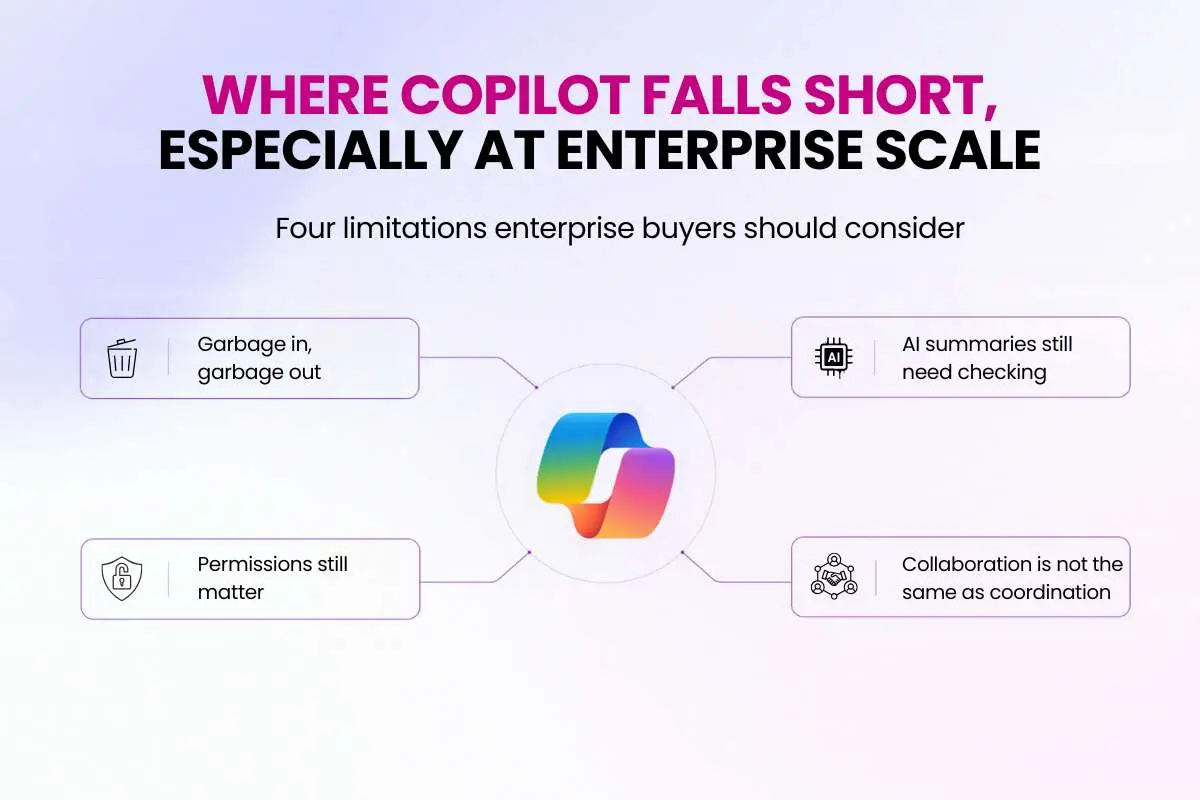
Four limitations enterprise buyers should consider
1. Garbage in, garbage out
If information is outdated, duplicated, or scattered across poorly managed systems, Copilot can only work with what it can access. AI does not magically repair years of messy file structures, unclear documentation, or abandoned Teams channels.
2. Permissions still matter
Copilot respects existing user permissions. That is important for security, but it also means organizations need to get their information governance right before scaling it. Messy permissions can make deployment more complicated, not less.
3. AI summaries still need checking
A polished summary can still be wrong. Microsoft warns that AI-generated meeting content may contain mistakes, so important decisions, commitments, and facts should be reviewed rather than accepted on autopilot.
4. Collaboration is not the same as coordination
A copilot can summarize a disagreement beautifully. It cannot necessarily resolve it.
That distinction matters when considering why business collaborations fail. Unclear ownership, weak incentives, poor decision-making, and dysfunctional team habits are organizational problems. Technology can reduce friction around them, but it cannot fix them by itself.
So before investing in Microsoft Copilot for business collaboration, buyers should ask a less exciting but more useful question: Is our collaboration problem actually an information problem?
Microsoft Copilot vs Gemini vs Slack AI: What Should Enterprise Buyers Choose?
If your company is already paying for Microsoft 365, Google Workspace, or Slack, the smartest AI choice may not be the tool with the longest feature list. It may simply be the one that fits into the work your employees are already doing.
That is where Microsoft Copilot for business collaboration has a natural advantage for Microsoft-heavy organizations. But Gemini and Slack AI have their own strengths, especially when those platforms already sit at the center of daily work.
| Enterprise priority | Microsoft Copilot | Gemini | Slack AI |
| Best ecosystem fit | Microsoft 365 | Google Workspace | Slack-centered organizations |
| Meeting collaboration | Teams | Google Meet | Slack Huddles |
| Document/work context | Microsoft 365 | Google Workspace | Slack + connected sources |
| Enterprise search | Microsoft 365 + connectors | Workspace + connected sources | Slack + connected sources |
| Best fit for | Microsoft-heavy enterprises | Google-heavy enterprises | Slack-heavy organizations |
| Main consideration | Microsoft data governance | Strongest within Workspace | Less natural if Slack is not the main hub |
Google has integrated Gemini across Workspace apps such as Gmail, Docs, Drive, Meet, and Chat, making it a natural choice for organizations already built around Google’s ecosystem. Slack takes a different route, with enterprise search spanning Slack and connected applications while respecting existing access permissions.
So if you are comparing Microsoft Teams vs Slack for Enterprise (Comparison), do not ask which platform has the better AI in isolation. Ask where your organization’s conversations, files, meetings, and decisions already live.
That is the most useful buying test.
The best AI collaboration tool is often the one sitting closest to where the company’s work already happens. And yes, that answer is considerably less exciting than declaring one platform the winner. It is also considerably more useful.
What the Numbers Say About Enterprise Copilot Adoption?
The enterprise interest is not exactly subtle. Microsoft reported that more than 90% of Fortune 500 companies use Microsoft 365 Copilot, according to its FY2026 Q1 earnings call.
It also reported that Lloyds Banking Group had deployed 30,000 Copilot seats and saw an average saving of 46 minutes per employee per day.
Those numbers are worth paying attention to, but they need a little context. They are Microsoft-reported adoption and customer outcomes, not independent proof that every enterprise will save 46 minutes a day.
That is why Microsoft Copilot for business collaboration should be judged against your own Collaboration KPIs Metrics, rather than a vendor’s headline number.
Track things such as meeting follow-through, time spent finding information, employee adoption and whether decisions actually turn into action.
Because “everyone is using it” is adoption. It is not ROI.
How to Measure Whether Copilot Is Improving Collaboration?
Microsoft Copilot for business collaboration should not be judged by how many employees clicked the Copilot button. That tells you about adoption. It does not tell you whether anyone is actually getting better work done.
Microsoft’s early Copilot research found that 70% of users reported increased productivity, while 68% said it improved their work quality.
Those numbers are encouraging, but they also show why measurement matters. Reported productivity gains are not the same thing as proven business impact. Enterprise buyers still need to measure whether meetings become more actionable, information becomes easier to find, and teams actually move work forward.
A better approach is to measure what changes around the work itself:
| Measure | What to look for |
| Meeting follow-through | Are decisions becoming assigned actions? |
| Information retrieval | Can employees find useful context faster? |
| Meeting catch-up | Can absent employees get up to speed sooner? |
| Email and chat load | Is less time spent processing information? |
| Adoption quality | Is Copilot being used for meaningful workflows? |
| Human review | How often do AI outputs need correction? |
This matters even more when looking at how to improve remote team collaboration. Distributed teams can benefit from faster summaries and easier access to context, but another AI tool will not automatically make people more aligned.
The real test is whether employees spend less time hunting for information and more time making decisions, solving problems, and moving work forward.
A company can have excellent AI adoption and still have terrible collaboration. Your dashboard should be able to tell the difference.
Is Microsoft Copilot the Future of Business Collaboration?

The future of business collaboration is probably not employees asking AI to write their 17th email of the morning. The more interesting shift is what happens around the work.
For Microsoft Copilot for business collaboration, that shift is moving toward three things:
- Find context: Bring together the information people need without another archaeological expedition through Teams and email.
- Maintain continuity: Help teams understand what happened, what was decided, and what still needs attention.
- Move work forward: Turn decisions and discussions into clearer next steps.
Microsoft is already pushing Copilot in this direction. Teams agents such as Facilitator can help with meeting agendas, notes, decisions, and follow-up tasks.
That points toward a broader AI in business collaboration model, where AI supports how teams coordinate work rather than simply helping people produce more text.
The bigger conversation around the future of business collaboration, collaboration in the age of AI, and agentic AI collaboration enterprise belongs in the wider cluster. For now, the useful test is simple:
Does the AI help the team move from “What happened?” to “What do we do next?”
Conclusion
Microsoft Copilot for business collaboration is worth serious consideration when it fits the way your organization already works, rather than forcing everyone to change how they work.
Copilot makes more sense if:
- Your organization relies heavily on Microsoft 365.
- Teams is a major collaboration hub.
- Employees spend too much time searching for information.
- Meetings create endless follow-ups and summaries.
- Your permissions and information governance are reasonably mature.
Pause before buying if:
- Your knowledge is poorly structured.
- Your biggest collaboration problems are organizational, not informational.
- Employees work mainly outside Microsoft 365.
- You have not defined what success should look like.
That last point matters. If you cannot define the problem, measuring the solution gets awkward very quickly.
And when considering why do business collaborations fail, remember that another tool cannot fix unclear ownership, weak incentives, or poor leadership.
The bigger lesson is the same one that sits at the heart of Business Collaboration: technology can make it easier for people to share information and coordinate work, but the organization still has to decide how people should work together.
Copilot can reduce collaboration friction. It cannot create a collaborative culture by itself.
FAQs
1. What is Microsoft Copilot for business collaboration?
Microsoft Copilot helps enterprise teams find information, summarize meetings, surface decisions, and turn discussions into actionable work across Microsoft 365.
2. How does Microsoft Copilot improve business collaboration?
It reduces time spent searching through emails, chats, meetings, and documents, helping teams access context and move decisions into action faster.
3. Is Microsoft Copilot better than Gemini or Slack AI?
Not universally. The best choice depends on which collaboration ecosystem your organization already uses and where its information and workflows live.
4. What are the limitations of Microsoft Copilot for collaboration?
Copilot cannot fix poor data governance, unclear ownership, messy information, weak decision-making, or collaboration problems caused by organizational habits.
5. How should enterprises measure Microsoft Copilot’s impact?
Measure outcomes such as meeting follow-through, information retrieval, employee adoption, time saved, and how often AI-generated content requires correction.