A contract’s life does not end when it is drafted. It gets edited, negotiated, signed, and then needs to be findable months later when someone asks what was actually agreed. Doing all of that across separate tools, a word processor, a PDF app, a signing service, and a shared drive means version confusion and lost time at every handoff. Using dedicated PDF e-signature software that lets you sign documents alongside editing and tracking keeps a contract’s whole life in one place. This guide compares the platforms that combine editing and signing most completely.
The real question is how much of the contract’s life a platform actually covers, not just whether it can produce a signature. Some tools sign well but barely edit. Some edit deeply but sign through a separate product. A few genuinely combine editing, collaboration, signing, and a searchable record in one place. The comparison below weighs that completeness, along with price.
Comparison Table: E-Signature With Editing and Workflow
| Tool | Best for | PDF editing | E-signature | Contract tracking | Pricing (from) |
| Lumin | Editing, signing, and tracking together, affordably | Yes | Yes, via Lumin Sign | Status, due dates, version history | Free plan; paid from ~$9/mo |
| Ironclad | Full contract lifecycle management | Limited | Yes | Deep, with clause library and obligations | Enterprise pricing |
| Juro | Contract lifecycle at growth-team scale | Limited | Yes | Strong, workflow-driven | Per-user subscription |
| PandaDoc | Workflow built around proposals and contracts | Light | Yes | Strong status tracking | Per-user subscription |
| DocuSign | E-signature at the largest enterprise scale | No | Yes, leading | Yes, agreement-focused | Per-user subscription |
| Adobe Acrobat | Deep editing plus signing | Yes, deep | Yes, via Acrobat Sign | Moderate | Subscription |
| Foxit | Editing plus signing at lower cost | Yes | Yes | Lighter | Per-user subscription |
Please note that features and pricing change over time.
Tool Overviews
1. Lumin
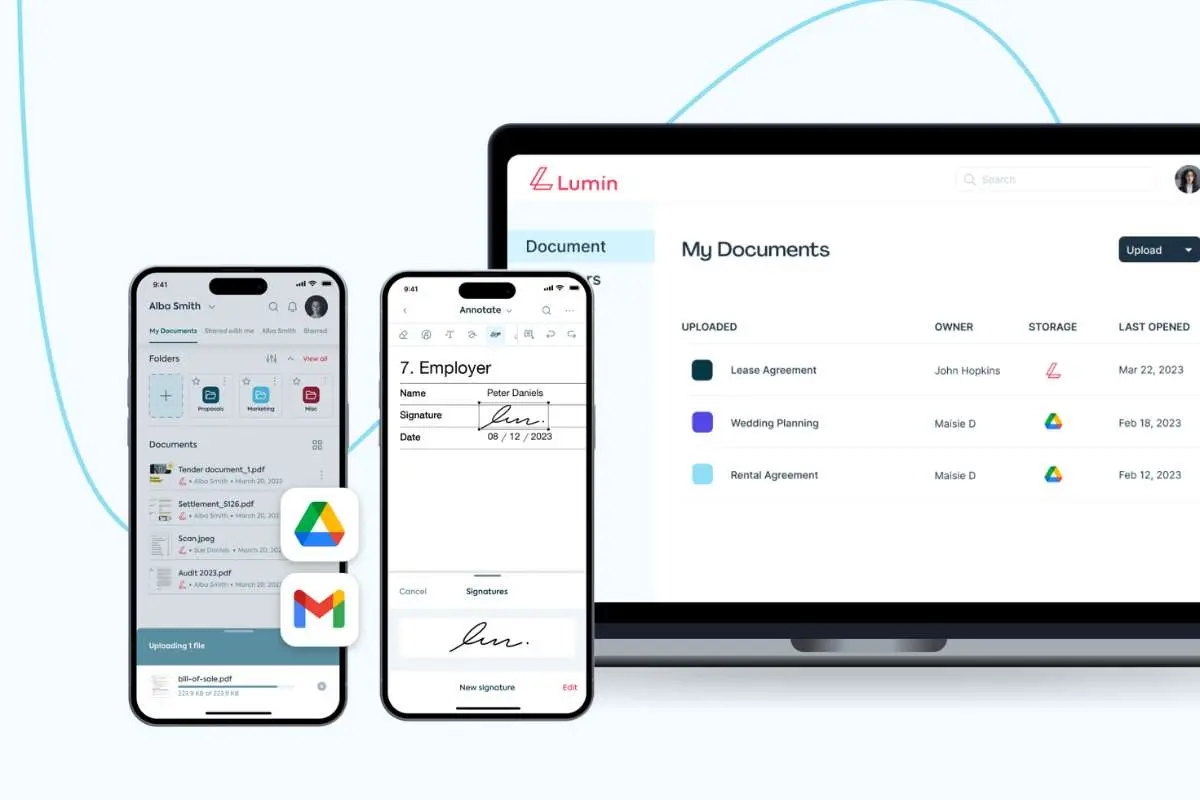
Lumin combines genuine PDF editing, real-time collaboration, and e-signature in one platform, which covers most of a contract’s practical life. You edit the terms, collaborate with comments and version history while it is negotiated, then send it for signature through Lumin Sign, which tracks status and sends reminders until every party has signed. Everything syncs to Google Drive and Microsoft OneDrive, so a signed contract stays findable where the team already keeps its files.
That combination is uncommon on a single platform at this price. Lumin Sign is free for up to 5 contracts a month, with paid plans for higher volume, and Lumin holds a 4.7 out of 5 on Capterra across roughly 234 reviews and a 4.5 out of 5 on G2 across roughly 817 reviews.
- Best for: Editing, signing, and tracking contracts together in one affordable platform.
- Standout: Genuine PDF editing combined with e-signature and status tracking, rare in one tool at this price.
- Free tier: Free plan available; Lumin Sign is free up to 5 contracts a month.
- Pricing: Paid plans for higher volume.
- Note: For full contract lifecycle management, clause libraries, negotiation workflows, and obligation tracking at scale, other tools offer greater depth.
2. Ironclad
Ironclad manages the full contract lifecycle: drafting, negotiation with a clause library, structured approval workflows, signing, and a searchable repository with obligation tracking, built for large-scale contract operations.
- Best for: Full contract lifecycle management at an enterprise scale.
- Standout: A clause library and obligation tracking that go well beyond editing and signing.
- Free tier: None.
- Pricing: Enterprise pricing.
- Note: Built for large legal operations; more system than most teams need for everyday contracts.
3. Juro

Juro handles contract creation, negotiation, and signing in one platform, with workflow automation aimed at fast-growing teams managing rising contract volume.
- Best for: Contract lifecycle management for a scaling team.
- Standout: Workflow automation that scales with growing contract volume.
- Free tier: Demo-based.
- Pricing: Per-user subscription.
- Note: A larger platform than a team handling occasional contracts typically needs.
4. PandaDoc
PandaDoc builds workflow around contracts and proposals, with strong status tracking and templates for recurring agreements, alongside signing.
- Best for: Workflow built around recurring proposals and contracts.
- Standout: Strong status tracking purpose-built for the proposal-to-signature process.
- Free tier: Trial.
- Pricing: Per-user subscription.
- Note: Editing is lighter than a dedicated PDF editor.
5. DocuSign
DocuSign leads on e-signature at the largest enterprise scale, with agreement tracking and deep integrations, but it is a signing platform rather than a PDF editor, so it does not cover the editing side of a contract’s life.
- Best for: E-signature at the largest enterprise scale.
- Standout: The most established e-signature platform, with broad enterprise integrations.
- Free tier: Trial.
- Pricing: Per-user subscription.
- Note: Not a PDF editor; editing capability is essentially absent.
6. Adobe Acrobat

Adobe Acrobat offers the deepest PDF editing, with signing through Acrobat Sign, suited to a team that edits contracts heavily before they go out.
- Best for: Deep editing paired with signing.
- Standout: The most complete editing toolset alongside signing.
- Free tier: Limited free online tools.
- Pricing: Subscription.
- Note: Editing and signing sit across two products, at a higher cost.
7. Foxit
Foxit pairs solid editing with signing at a lower price than Adobe, covering both in one tool without the enterprise cost.
- Best for: Editing and signing together at a lower cost.
- Standout: Combined editing and signing well below Adobe’s price.
- Free tier: Limited free tier.
- Pricing: Per-user subscription.
- Note: Contract tracking is lighter than the workflow-focused platforms.
Why Lumin Stands Out
Lumin stands out because it genuinely combines editing and signing, a pairing that many tools on this list do not manage. DocuSign leads on signing but barely edits. Adobe edits deeply but signs through a second product. Lumin does both in one browser-based platform, plus real-time collaboration and status tracking through Lumin Sign, and connects to Google Drive and Microsoft OneDrive, so a signed contract stays where the team can find it later. For a business that wants to edit, negotiate, sign, and track a contract without juggling separate tools, that is the practical version of end-to-end.
Closing Thoughts
The right platform depends on the scale of your contract operation. For full lifecycle management with a clause library and obligation tracking, Ironclad and Juro lead at enterprise scale. For standalone e-signature capability at the largest scale, DocuSign leads, though it does not edit documents directly. For genuinely combining editing, signing, and tracking in one affordable platform, Lumin serves as a comprehensive PDF e-signature software that covers most businesses’ contract management needs well. Before choosing, run a real contract through the full cycle—editing, negotiating, signing, and finding it again later—to confirm one tool covers it all.
FAQ
1. Which e-signature tool also lets me edit the contract itself?
Lumin combines genuine PDF editing with e-signature through Lumin Sign in one platform. Adobe and Foxit also combine editing and signing. DocuSign, by contrast, is a signing platform with little to no editing capability. Confirm a tool offers real editing, not just markup, before relying on it for contract work.
2. What does end-to-end contract management actually require?
At minimum, drafting or editing, negotiation or collaboration, signing, and a way to find the signed document later. Full contract lifecycle management adds a clause library, structured approval workflows, and obligation tracking. Lumin covers the first set well; Ironclad and Juro are built for the fuller lifecycle at scale.
3. Is DocuSign a contract management platform?
DocuSign is primarily an e-signature platform with some agreement tracking, rather than full contract lifecycle management or a PDF editor. For editing a contract before it is signed, a tool like Lumin or Adobe is needed alongside it, or in place of it if editing and signing together matters more.
5. What’s the difference between an edit-and-sign tool and a CLM platform?
An edit-and-sign tool like Lumin covers editing, collaboration, signing, and basic tracking, which suits most everyday contract work. A CLM platform like Ironclad or Juro adds clause libraries, structured negotiation, and detailed obligation management, built for large legal operations managing high contract volume.
6. What is the most affordable option for combining editing and signing?
Lumin offers a free plan plus paid plans from around $9 a month, with Lumin Sign free for up to 5 contracts a month. Foxit is also competitively priced for combined editing and signing. Match the tool to your contract volume rather than paying for enterprise CLM features you will not use.