You know those software decisions where everyone has an opinion, someone has already picked a favourite, and the meeting somehow lasts 45 minutes longer than it should? Choosing an enterprise collaboration platform can go exactly that way. Teams has its fans. Slack has its fans. Neither group is especially interested in admitting the other might have a point.
The better question is not which platform is universally better. It is which one fits how your business already works. Microsoft Teams vs Slack for Enterprise becomes a much more useful comparison when you look at your existing tools, workflows and communication habits. Teams can make sense when Microsoft 365 is deeply embedded, while Slack can suit organisations that value flexible, integration-heavy communication.
And chat is only the beginning. Enterprise buyers also need to weigh security, compliance, AI, administration, global deployment, and governance. The shiny interface matters. What happens behind it matters considerably more.
Microsoft Teams vs Slack for Enterprise Comes Down to More Than Chat
The biggest difference between Teams and Slack is not the chat window. It is where each platform sits in your wider technology stack. Teams is closely tied to Microsoft 365, so meetings, files, identity, calendars, and other workplace tools can live within the same ecosystem. Slack takes a communication-first approach, with a broad app ecosystem that connects with the tools teams already use.
That makes your existing setup a big part of the decision. Business Collaboration is about more than getting people into the same chat. Before comparing feature lists, look at:
- What your teams already use every day
- Where your documents, meetings, and workflows live
- How much integration flexibility you need
More features do not automatically mean a better platform. Buying software because you liked the interface is a bit like choosing an office because you liked the chairs. Microsoft Teams vs Slack for Enterprise only gets useful when the platform fits the way your business actually operates.
Teams vs Slack: The 10-Criteria Enterprise Head-to-Head
If you’re comparing Microsoft Teams vs Slack for Enterprise, looking at features one by one can get messy fast. A cleaner approach is to judge both platforms against the things enterprise buyers actually have to care about.
That includes security, compliance, AI, meetings, integrations, and how well the platform fits the tools your teams already use.
| Enterprise criterion | Microsoft Teams | Slack | Edge |
| Security | Strong enterprise controls | Strong enterprise controls | Context dependent |
| Compliance | Deep Microsoft compliance stack | Strong enterprise compliance | Teams |
| AI | Microsoft 365 Copilot ecosystem | Slack AI and agents | Context dependent |
| Meetings | Deep native meeting capability | Strong, different emphasis | Teams |
| Integrations | Microsoft ecosystem + apps | Very broad app ecosystem | Slack for breadth |
| Global deployment | Mature enterprise deployment | Global enterprise footprint | Tie/context |
| Admin controls | Extensive Microsoft admin stack | Strong enterprise administration | Teams |
| File collaboration | Native Microsoft 365 ecosystem | Integration-led | Teams |
| User experience | Broad workplace hub | Communication-first | Context dependent |
| Tech stack fit | Best with Microsoft 365 | Strong across mixed SaaS stacks | Depends |
The important bit is that there is no universal winner. Cross-Functional Collaboration often depends on how easily people, tools, and information move between departments, which is why your existing technology stack matters as much as the feature list.
Slack vs Microsoft Teams for Enterprise Security and Compliance
Security is where this comparison stops being about who has the nicer interface. For an enterprise, the real questions are about who can access what, what gets retained, and how easily admins can prove what happened.
Both platforms offer serious controls, but their strengths sit in slightly different places:
- Teams: Connects closely with Microsoft Purview for DLP, retention, eDiscovery, legal holds, audit logs, and sensitivity labels.
- Slack: Has established enterprise adoption, with 200,000+ paid customers, 77 of the Fortune 100 using Slack, and daily active users in 150+ countries, according to Slack.
- Both: Need to be assessed against your identity, access, encryption, regulatory, and governance requirements rather than judged by a blanket “more secure” label.
That is especially relevant when Microsoft Teams vs Slack for Enterprise involves global teams. Cross-Cultural Collaboration can bring different regional requirements, working practices, and compliance expectations into the decision too.
Microsoft Teams vs Slack for Enterprise AI: Which One Adds More to the Workflow?
AI can summarize a meeting in seconds. Great. But if it cannot help you find the right document, pull useful context, or move the next task forward, you have mostly built a very fast meeting note-taker.
The better question is not who has more AI features, but where that AI gets its context. Both platforms are moving beyond summaries and search into workflow automation, agents, and enterprise knowledge.
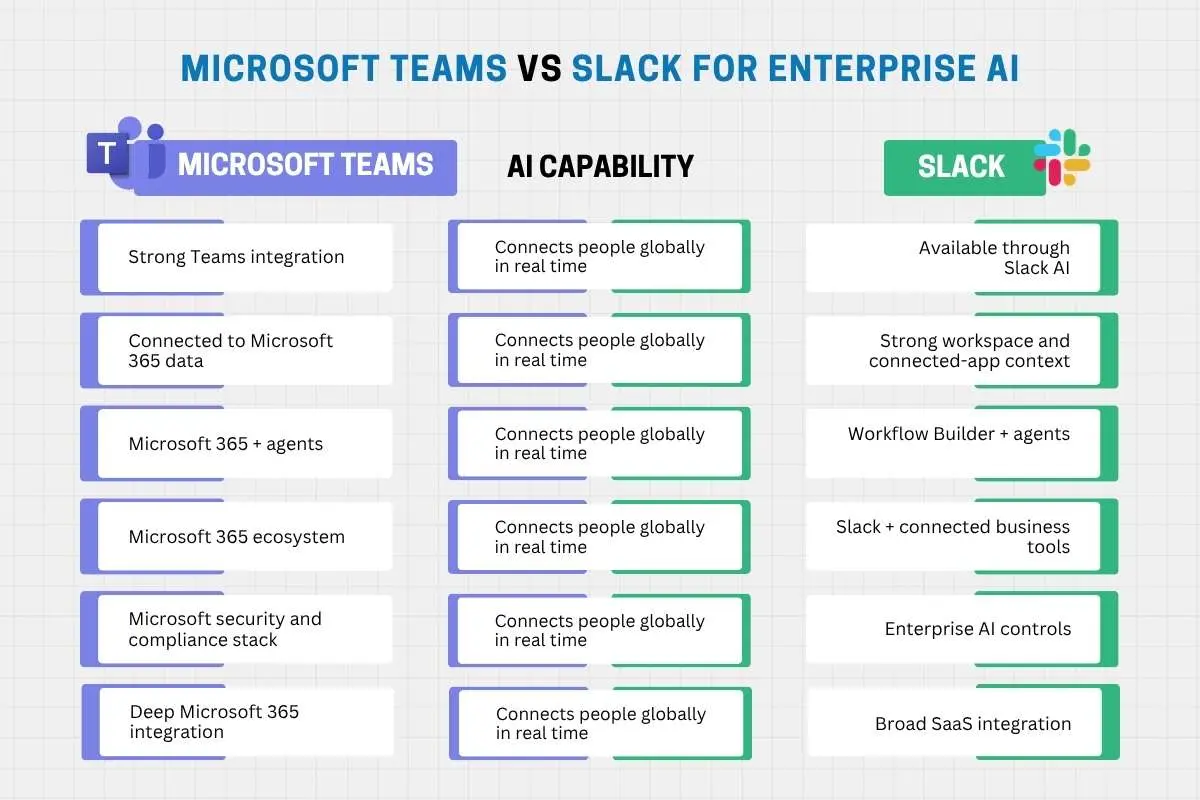
| Microsoft Teams | AI capability | Slack |
| Strong Teams integration | Meeting summaries | Available through Slack AI |
| Connected to Microsoft 365 data | Knowledge retrieval | Strong workspace and connected-app context |
| Microsoft 365 + agents | Workflow automation | Workflow Builder + agents |
| Microsoft 365 ecosystem | Enterprise context | Slack + connected business tools |
| Microsoft security and compliance stack | AI governance | Enterprise AI controls |
| Deep Microsoft 365 integration | Productivity ecosystem | Broad SaaS integration |
Microsoft says Teams has over 320 million monthly active users, giving its AI layer a huge existing workplace environment to operate within.
So when weighing Microsoft Teams vs Slack for Enterprise, the real question is whether AI can work with the information and tools your employees already rely on. Microsoft Copilot for Business Collaboration fits naturally into that decision, particularly when enterprise knowledge needs to move beyond the chat window.
Slack vs Teams for Global Deployment, Integrations and Everyday Work
Buying the platform is the easy part. Then comes the awkward question: what happens when thousands of employees actually have to use it? Deployment, integrations and everyday workflows can quickly expose the differences between the two.
The ecosystem you already have matters
Teams has a natural advantage for organisations already invested in Microsoft 365, especially when files, meetings, calendars and identity already sit across Microsoft’s ecosystem. Slack takes a broader integration approach, connecting with a wide range of third-party tools. Slack says its ecosystem includes more than 2,500 apps, making integration breadth a genuine strength.
What work looks like after rollout
For Remote Collaboration, global deployment and external communication can matter just as much as the software itself. Cross-Functional Collaboration brings another consideration: can people across departments move between conversations, files, and workflows without creating another maze of tools?
That is why Microsoft Teams vs Slack for Enterprise cannot be settled by counting integrations. Slack’s ecosystem strength does not automatically make it the better choice, just as Teams’ Microsoft 365 depth does not automatically make it the winner. The right fit depends on the stack your business already runs.
Microsoft Teams vs Slack for Enterprise Administration and Adoption
Enterprise software has two audiences: the employees who use it and the administrators who have to live with it. The second group tends to have strong opinions about policy controls, provisioning and app governance for good reason.
The admin side
Teams offers centralized controls for calling, meetings and messaging, with policies that can be assigned to individuals, groups or batches of users. It also fits into Microsoft’s wider approach to identity, security and device management.
Slack provides its own enterprise controls for access, permissions, apps and external collaboration. The difference becomes more noticeable when organisations need to manage:
- User provisioning and guest access
- Security and app policies
- Devices and permissions
- Training and adoption
For Microsoft Teams vs Slack for Enterprise, administration should be weighed alongside usability. A platform can have impressive controls and still frustrate employees. Collaborative Leadership Style also matters here: leaders need enough structure to guide adoption without turning every new feature into another workplace obstacle.
Slack vs Microsoft Teams Pricing and Existing Tech Stack Fit
Price tags can be wonderfully misleading. A platform that looks cheaper per user can become expensive once migration, training, integrations, and administration enter the picture. And enterprise software has a habit of bringing friends to the bill.
Think beyond the licence
For Microsoft Teams vs Slack for Enterprise, the real calculation should include:
- Existing licences: If your business already runs heavily on Microsoft 365, Teams may reduce the need for another major platform. A company built around Salesforce and other SaaS tools may see a different equation with Slack.
- Implementation: Migration, employee training, app integrations, and ongoing administration can quickly outweigh a small licence-price difference.
- AI and duplication: Add AI costs and ask whether the platform replaces existing tools or simply joins them. Paying twice for similar capabilities is not exactly a bargain.
So the cheapest platform on paper may not be the cheapest to operate. The better choice is the one that becomes part of your existing Business Collaboration Tools ecosystem rather than another system everyone has to maintain.
Microsoft Teams vs Slack for Enterprise: When Should You Choose Each?

There is no universal winner here. Microsoft Teams vs Slack for Enterprise should come down to how your organisation already works, what its IT team needs to manage, and where employees actually spend their time.
| Choose Microsoft Teams if your priority is… | Choose Slack if your priority is… |
| Microsoft 365 consolidation: Your business already relies heavily on Outlook, SharePoint, OneDrive and Microsoft 365. | A mixed SaaS environment: Your teams work across Salesforce, Google Workspace and a wide range of third-party tools. |
| Integrated meetings and productivity: Teams meetings, calendars, files and collaboration need to sit within one workplace environment. | Communication-first collaboration: You want a platform centred on channels, conversations and fast-moving team communication. |
| Centralised governance: Your IT team wants Microsoft identity, security, compliance and device-management tools working together. | Integration flexibility: Connecting existing business applications is a bigger priority than consolidating around one vendor. |
| Microsoft AI adoption: Your organisation wants Copilot connected to its broader Microsoft 365 data and workflows. | Slack’s communication ecosystem: Your organisation is already invested in Slack and its connected applications and workflows. |
| Enterprise standardisation: Reducing the number of workplace platforms and consolidating your technology stack matters. | Platform independence: You want a collaboration layer that does not depend as heavily on one productivity-suite vendor. |
The table points to a simple idea: fit matters more than feature count. If your business already runs on Microsoft 365, Teams can extend an ecosystem of employees, and IT teams know. If your organisation relies on a wider mix of SaaS tools, Slack’s flexibility may carry more weight. Neither advantage means much if it does not match how work actually gets done.
For a CEO Collaboration Strategy, the decision should also consider long-term organisational fit, not just today’s preferences. Neither platform is automatically better. The better choice is the one that strengthens existing workflows without creating another system employees and IT teams have to wrestle with.
Conclusion
By now, Microsoft Teams vs Slack for Enterprise should feel less like a Teams-versus-Slack showdown and more like a question of fit. Teams makes the stronger case when Microsoft 365 already sits at the centre of your business, connecting meetings, files, identity, security and everyday productivity. Slack makes more sense when flexible, integration-led communication is the bigger priority, and your teams already live across a broad SaaS landscape.
As Dr. Siraj Rahim puts it, “Technology is not the ultimate goal. Its real purpose is to support people, protect their work, and keep essential operations running safely.” That idea applies neatly here. The best collaboration platform is not the one that looks most impressive on paper. It is the one that supports the people using it without creating unnecessary friction.
The fairest way to decide is to take the ten criteria we covered and test them against your own technology stack, governance needs, and workforce. That matters because good Business Collaboration is not about putting everyone in the same software. It is about giving people the right environment to communicate, share information, and get work moving without unnecessary friction.
In enterprise software, the best platform is usually the one that gets out of the way and lets people work.
FAQs
1. Is Slack or Teams easier to learn?
Slack often feels simpler for channel-based communication, while Teams offers a broader workplace environment with more moving parts.
2. Can Slack and Microsoft Teams work together?
Yes. Third-party integrations and connectors can allow organisations to bridge communication and workflows between both platforms.
3. Can an enterprise use both Slack and Teams?
Yes, but running both can create duplicated conversations, fragmented information, and additional administration.
4. Which platform is better: Microsoft Teams vs Slack for Enterprise for remote employees?
Both support distributed teams; the better choice depends on communication habits, connectivity needs, and the systems remote employees already use.
5. Can companies migrate from Slack to Teams or vice versa?
Yes. Migration tools and specialist services can transfer selected messages, files, and user data between platforms, depending on requirements.

![6 Best AI-Powered Compliance Tools for Packaging Reviews [2026] | The Enterprise World](https://theenterpriseworld.com/wp-content/uploads/2026/08/4-1-6-best-ai-powered-compliance-tools-for-faster-packaging-reviews-2026-source-impakter-com.webp)