CCleaner has earned its place on millions of PCs. It’s been around since 2004; it’s still one of the most thorough tools for clearing browser caches, cookies, and temporary files, and the free edition does enough that many people never pay for anything else. It also runs on Windows, macOS, and Android, which few rivals match.
People who leave usually do so for one of two reasons. The first is trust. In September 2017, attackers compromised CCleaner’s build process and shipped a backdoored version 5.33 to users; Cisco Talos’s analysis of the command-and-control server found more than 700,000 machines had checked in, with a second-stage payload aimed at major technology companies. CCleaner has since changed hands again and now sits inside Gen Digital alongside Avast, the company the FTC ordered in 2024 to pay $16.5 million and stop selling browsing data for advertising. None of that means today’s CCleaner is unsafe, but for a privacy tool, the history makes some users want a different vendor.
The second reason is cost. CCleaner Professional covers a single PC for $44.95 a year, and covering five machines with round-the-clock support means the $89.95 Premium Bundle.
If trust is what’s pushing you away, BleachBit is the strongest CCleaner alternatives: it’s open source, free, and does the same core cleaning. Microsoft’s own PC Manager is the easy free option, Iolo’s System Mechanic suits households and small offices that want repairs automated and a person to call, and Ashampoo and IObit cover the one-time-license and budget ends of the market.
One note before the list. AVG TuneUp, Avast Cleanup and Norton Utilities are all Gen Digital products too. They’re capable tools, but if your reason for leaving CCleaner is its ownership, they don’t solve it.
Here are the five CCleaner alternatives to consider when thinking of switching
If you’re leaving over trust or privacy
1. BleachBit
BleachBit is what CCleaner would look like as a community project. It’s a free, GPL-licensed cleaner that has been in development since 2008 and runs on Windows and Linux, with no paid tier, no upsell, and no account. Because the code is public, you don’t have to take anyone’s word about what it collects. It clears browser data, system caches, and application leftovers, and its file shredder overwrites deleted files so they can’t be recovered. New cleaning rules are written in a simple markup format called CleanerML, so community-contributed support for obscure apps turns up quickly.
What you give up: Everything that isn’t cleaning. There’s no startup manager, no software updater, and no driver tools, and the interface is plain to the point of austere. You also lose CCleaner’s cross-platform mobile app. For people who used CCleaner mainly to clear browsers and temp files, none of that will matter.
If you want to stop paying altogether
2. Microsoft PC Manager
Microsoft’s free utility launched in 2024 and covers the same ground as CCleaner’s free tier on Windows 10 and 11: file cleanup, a startup and process manager, and basic repair tools. It’s first-party software, so there’s no third-party vendor with access to your system at all. Combined with Windows’ built-in Storage Sense and drive cleanup settings, it replaces most of what casual CCleaner users rely on.
What you give up: Depth and some neutrality. PC Manager has been criticized for suggesting your system needs “repair” when Bing or Edge aren’t your defaults, which is Microsoft promoting its own services rather than maintaining your PC. It has no software updater and no mobile version.
If you need help, not just a cleaner
3. Iolo System Mechanic

CCleaner is a tool you run. System Mechanic is closer to a service that runs itself, and that’s the reason to switch. Its automated maintenance works while the PC is idle, clearing junk, removing bloatware, and cutting unneeded startup entries without anyone opening the app. For a household with one family member who “does the computers,” or a small office without IT staff, that shift from manual to automatic is the whole point.
The other difference is human support. CCleaner only includes round-the-clock premium support in its most expensive bundle. iolo’s System Mechanic comes with free product support, and reviewers report phone and live chat staffed around the clock. When a tune-up goes wrong on a machine someone needs for work tomorrow, being able to reach a person matters more than any feature list.
What you give up: Platform coverage and flexibility. System Mechanic is Windows-only, so Mac and Android users lose coverage they had with CCleaner. The refund policy is also stricter than you might expect: iolo accepts refund requests within 30 days but deducts a 15% processing fee, and the subscription renews automatically. And if you liked CCleaner because you could see and control each item before deleting it, System Mechanic’s more automated approach will feel like handing over the keys.
If subscriptions are the problem
4. Ashampoo WinOptimizer Pro
WinOptimizer is sold as a one-time purchase, with upgrades priced separately when major versions ship, rather than as an annual subscription. For anyone who resents paying CCleaner every year for the same cleaning, that alone justifies a look. It also goes further than CCleaner in some areas: a crash analyzer that reads Windows error logs in plain English, a service manager, and file tools for encrypting, wiping, and undeleting.
What you give up: CCleaner’s reach beyond Windows; for a start, WinOptimizer supports Windows 8, 10, and 11 and nothing else. A one-time license also means you’ll pay again for the next major version if you want its new features, so the savings are real but smaller than they first look over a five-year horizon.
If you’re managing several PCs on a budget
5. IObit Advanced SystemCare Pro
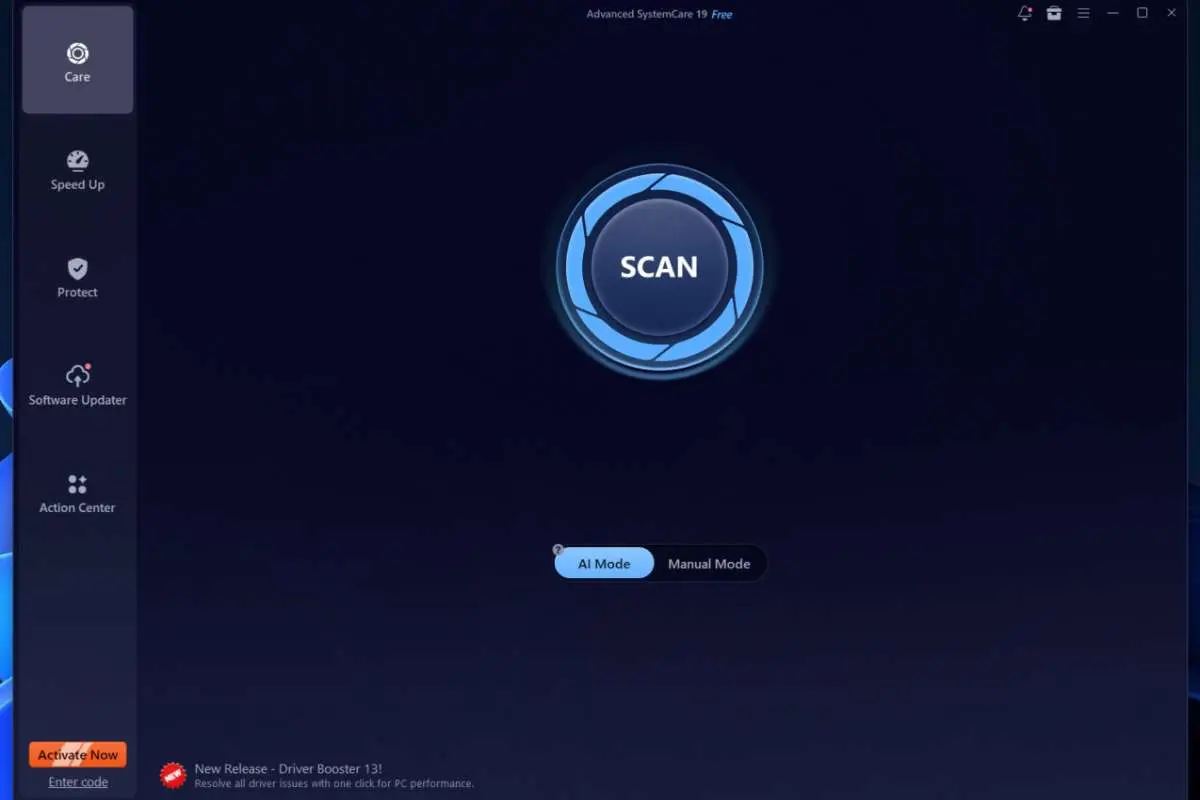
Advanced SystemCare’s first-year promotions are aggressive, with three PCs covered for about $20 against CCleaner’s $64.95 for three devices. It’s built for people who want one button and a green checkmark, and it adds a software updater and ransomware-protected folders in the Pro edition.
What you give up: This is the one to approach carefully if you left CCleaner over trust. The installer bundles offers for other software, so you need to read each screen during setup, and you can’t exclude individual files from cleaning. Promotional pricing also doesn’t last beyond the first term.
Who should stay with CCleaner?
If you have Macs or Android devices you want covered under the same license, CCleaner is still one of the very few options that spans all three platforms. The same goes if you use Recuva for file recovery or Speccy for hardware inventory, both of which come with Professional Plus. And if you’re on the free tier and happy with it, the reasons to switch are mostly philosophical. The 2017 incident was serious, but it was caught, and the product has been through years of scrutiny since.
For everyone else, the right CCleaner alternatives depend on why you’re leaving. Pick BleachBit if it’s about trust, PC Manager if it’s about money, System Mechanic if you’d rather maintenance happened without you, and Ashampoo if you’re simply done with subscriptions.